
Your needs, this model
Does it fit your priorities?
Can an included workstation provide a 20 by 50-inch belt?
The exact Classic table gives a 20 by 50-inch belt and includes the desk.
Explore this need in the finder →Can one documented configuration fit a 40-inch width and 69-inch depth?
The 38-inch desktop configuration is 68.5 inches deep. The separate 48-inch option does not meet that width limit.
Explore this need in the finder →Can a supplied console meet a 400 lb user requirement?
The exact package states 400 lb with an integrated armrest console; no supplied handheld remote is established.
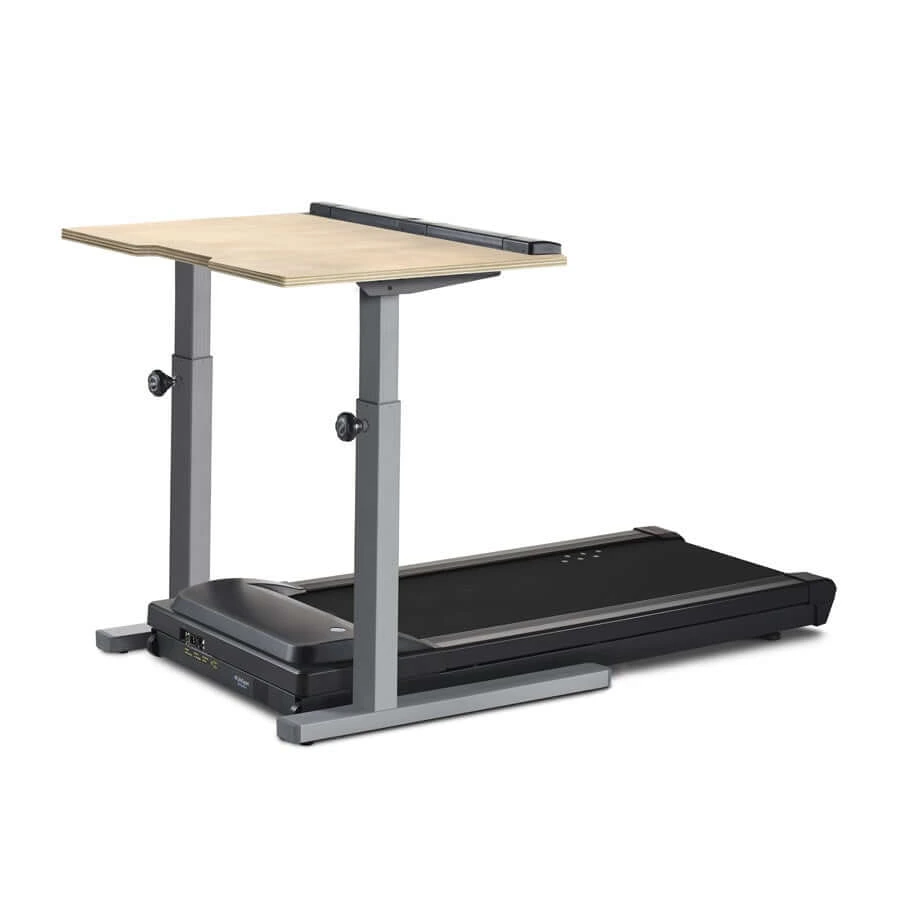
Explore this need in the finder →LifeSpan TR5000-Classic DT5: a manually adjusted workstation with a longer walking belt. The Classic package combines a TR5000 treadmill with a desk that changes height manually. Its 20 by 50-inch published walking surface is a useful distinction from the 48-inch belts on many LifeSpan desk packages. Its adjustment routine is a separate decision from the treadmill's capacity.
Manual height suits a stable working position
The official Classic page lists height adjustment from 33.5 to 52.5 inches. This can suit someone setting one walking position and leaving it there. It is a different ownership routine from pressing a powered desk's preset several times each day. Confirm how the actual frame is adjusted, what equipment must be removed and whether another person is needed before changing height.
The lower height should not be assumed to provide the same seated-desk flexibility as a powered frame starting around 25 inches. Plan the working position with the belt's 4.6-inch step-up in mind. Screen height, keyboard position and room for the pointing device still need individual attention, even when the upper desk setting appears generous.
Choose the desktop width deliberately
The package offers 38 and 48-inch desktop widths, each listed at 29 inches deep. A narrower surface saves room, while the larger option can accommodate more equipment. Neither changes the treadmill's walking surface. Establish where every monitor, keyboard and cable will go rather than choosing a width from its appearance in a photograph.
The official assembled footprint is 68.5 inches deep and either 38 or 48 inches wide. Match the selected width to that figure and allow the required operating access outside it. A complete workstation needs space to enter, stop and leave the belt. Its printed footprint is not the same as the complete usable room around it.
The longer belt has its own appeal
The exact current package table states a 20 by 50-inch belt and 400 lb maximum user weight. That gives more published walking length than the 20 by 48-inch surface listed for the TR5000-Omni. A buyer who values the extra belt length should compare it directly with the inconvenience or simplicity of manual desk-height adjustment.
The range is 0.4–4.0 mph, with the page saying the upper-speed setting defaults to 2 mph and can be changed. Check that configuration before assuming the machine is unable to reach the stated maximum. A slow starting range can support learning the workstation, but it does not establish the right pace for a particular work task or person.
Integrated controls are part of the package
The console is built into the desk's padded armrest area and provides steps, time, distance, calories and speed information. This is different from a base-only treadmill with a separately positioned desktop controller. Keep the controls reachable when arranging the keyboard, and learn the stop routine before dividing attention between walking and work.
The manufacturer describes an interlocking desk-and-treadmill arrangement and internal cable routing. Follow the assembly procedure when positioning the base, desktop and work equipment. Check that the completed arrangement supports your intended monitor setup securely and leaves the controls within comfortable reach.
Check the DT5 version and moving plan
The package page lists a 119 lb treadmill and a 60 lb desk. Those figures make relocating the workstation a substantial task despite the base's transport wheels. The owner directory retains DT5 manuals from multiple years, so the model year, console and assembly hardware matter when evaluating an existing unit or a specific offer.
The Classic page was marked “Sold out” and does not give a model-specific daily-hour recommendation. Choose it for the longer belt and a mostly fixed manual-height workspace after confirming the actual version. The TR5000-Omni has a shorter belt and coordinated powered desk; Desk Dash Pro pairs a different TR5000 configuration with a glass standing desk.
Key details at a glance
| Handrail supplied | No |
|---|---|
| Load configuration | 400 lb exact-package conservative allowance. |
| Usable belt length | 50 in |
| Usable belt width | 20 in |
| Stated machine weight | 119 lb |
| Walking speed arrangement | 0.4–4 mph using the reviewed supplied control. |
| Incline mechanism | No incline function |
| Storage routine | Complete desk installation; component dimensions and moving weights must be planned separately. |
| Documented daily use | Exact-model daily-hour recommendation not confirmed. |
Use the exact model’s instructions for operating limits, supplied equipment and version differences.
Sources for this assessment
Find a walking pad for your real workspace.
Start with the load allowance, usable belt and storage routine, then add essential controls.